
FIG. 01
RECORD DATA
Category
Software
TARİH
We have a model that scores 0.950 mAP50 on our validation set. It picks out mannequins and tents in aerial imagery without breaking a sweat. Then we take the altitude from 20 meters up to 60 meters and the model goes blind — the target is still in the frame, you can pick it out by eye, but no detection box ever comes back.
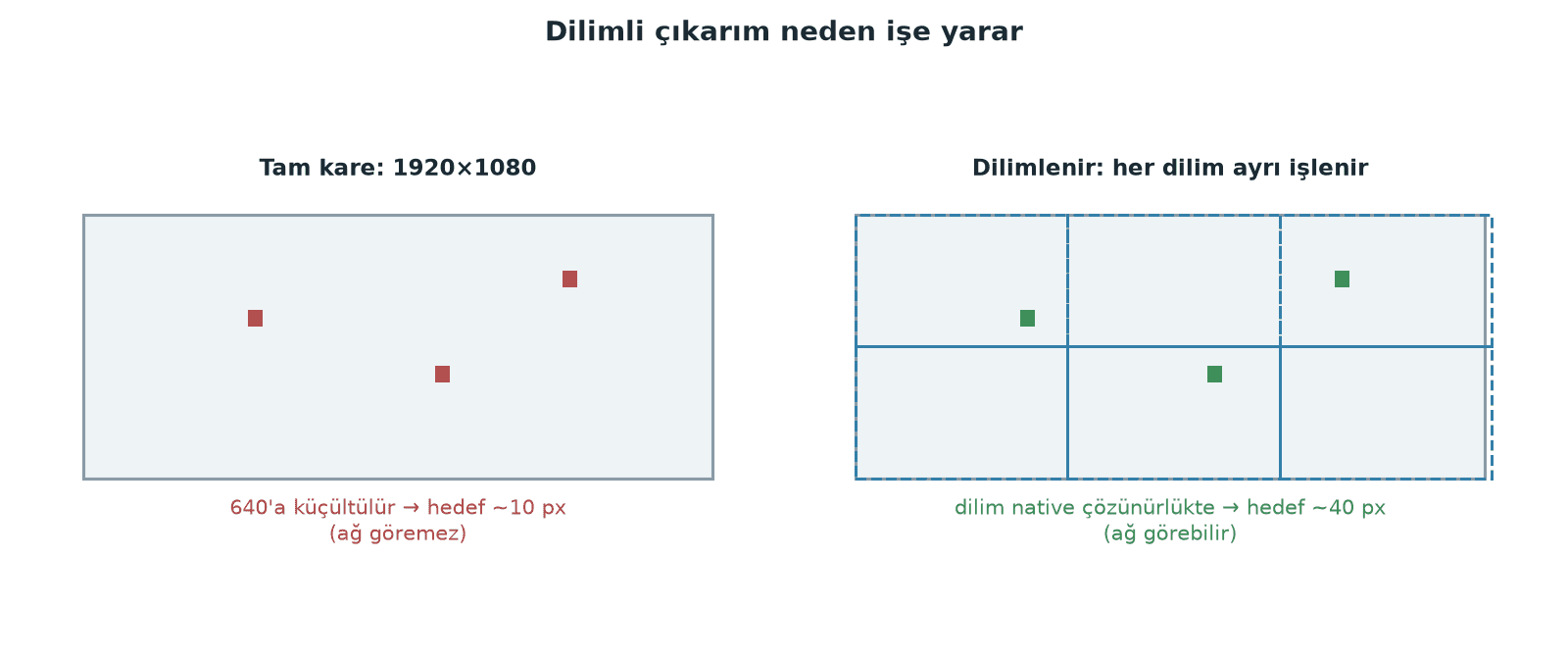
The first reflex is to blame the model: "it wasn't trained enough," "we need a bigger model." Both are usually wrong. The problem isn't what the model learned, it's how many pixels we hand it. When we train YOLO11m on 1280-pixel inputs and then feed it 640 full frames in flight, we're shrinking a 1920×1080 RTSP stream by a factor of 3. A mannequin that is 30 pixels wide in the frame drops to 10 pixels as far as the model is concerned.
In this post we go through where small objects get lost, how SAHI (Slicing Aided Hyper Inference) solves it, and how many times over it multiplies our compute cost. At the end we also talk about when it isn't worth it — in our flight scenario, most of the time it isn't.
Why small objects disappear: loss in three stages
The loss doesn't happen in one place. It happens in three places that stack on top of each other.
1. Input scaling. The model runs at a fixed resolution (imgsz). Take a 1920×1080 frame down to 640 and you lose a factor of 3 in every direction — meaning the object's area is divided by 9.
2. Stride and downsampling. YOLO11's detection heads are fed from three pyramid levels. The official yolo11.yaml configuration labels them explicitly: P3/8-small, P4/16-medium, P5/32-large. Even P3, the finest of the three, downsamples the input by 8. An object that is 10 pixels at the model's input maps to about 1.25 cells on the P3 grid.
3. Feature map resolution. Pulling a class and a box regression out of a trace a cell and a half across strains the information the network has to work with. COCO already defines a "small object" as anything under 32×32 = 1024 pixels in area; in flight we go well below that.
Here is how the same 30-pixel object looks to the model across different setups:
Setup (source 1920×1080) | Scale | Size at the model | On the P3/8 grid |
|---|---|---|---|
Full frame, imgsz=640 | 0.33× | ~10 px | ~1.3 cells |
Full frame, imgsz=1280 | 0.67× | ~20 px | ~2.5 cells |
640 slice, imgsz=640 | 1.00× | 30 px | ~3.8 cells |
512 slice, imgsz=640 | 1.25× | ~37 px | ~4.7 cells |
The only variable in that table is slicing. Model, weights, training — all identical.
What SAHI does
SAHI's idea is simple: don't change the model, change the input. There are three steps.
Slicing. The image is cut into overlapping fixed-size tiles. Each slice goes through the model on its own. If a slice is smaller than the model's imgsz, it gets scaled up — and the object grows with it.
Overlap. Neighboring slices overlap so that an object sitting on a slice boundary doesn't get cut in half. The default overlap ratio is 0.2.
Global merge. Each slice's boxes are mapped back into original image coordinates and merged in a single pass over the whole frame. SAHI's default merger is GREEDYNMM, its default match metric is IOS (intersection over smaller), and the threshold is 0.5. IOS is the metric of choice because a box left half-finished at a slice boundary has a low IoU against the full box but a high IOS.
There is one more quiet but important default: perform_standard_pred=True. On top of the slices, SAHI also runs a prediction on the full frame. The library's own documentation is clear about the reason — "to improve large object detection accuracy." Because slices chop large objects into pieces, sliced inference on its own loses the big ones.
On the install side, Ultralytics' own guide says pip install -U ultralytics sahi.
How much does it actually buy you?
The SAHI paper (Akyon, Altinuc, Temizel — ICIP 2022) benchmarks three detectors on the VisDrone and xView aerial imagery datasets. The reported results:
Detector | Sliced inference only | + sliced fine-tuning (cumulative) |
|---|---|---|
FCOS | 6.8% AP | 12.7% AP |
VFNet | 5.1% AP | 13.4% AP |
TOOD | 5.3% AP | 14.5% AP |
The real message here is the second column: slicing inference alone doesn't even get you half the gain. Slice the training data as well and the gain roughly doubles. The reason is scale matching — train the model on full frames and run it on slices, and in flight it meets an object scale it has never seen.
Note: the Ultralytics SAHI guide doesn't give a quantitative AP figure, only a qualitative account of the benefit. The numbers come from the paper.
Slicing the training data
SAHI's CLI does this in a single command, and the labels are shifted into slice coordinates automatically.
Two defaults deserve attention. min_area_ratio defaults to 0.1: if a clipped annotation's area falls below 10% of the original, the label is silently dropped. Then there's the --ignore_negative_samples flag — leave it off and slices containing no objects land in the dataset too. Those are valuable negative samples (they cut down false positives), but there can be enough of them to inflate epoch time and wreck your class balance. Our own dataset is already imbalanced (~7:1 between classes), so we didn't want to switch them on without first reviewing the negative-slice ratio.
The cost: how many forward passes?
This is SAHI's bill, and it isn't open to negotiation. For a 1920×1080 frame, here are the slice counts SAHI's slice-generation algorithm produces:
Slice size | Overlap | Grid | Slice count | +full frame = total passes |
|---|---|---|---|---|
1024×1024 | 0.2 | 3×2 | 6 | 7 |
640×640 | 0.2 | 4×2 | 8 | 9 |
512×512 | 0.2 | 5×3 | 15 | 16 |
512×512 | 0.4 | 6×3 | 18 | 19 |
On our flight setup (Jetson Orin NX 16GB, YOLO11m, 640 full frame) we measured 15-20 FPS, so roughly 50-67 ms per frame. Running 9 passes with 640 slices works out, by naive multiplication, to ~450-600 ms — about 2 FPS. That's a projection; we haven't measured it on the vehicle. But the order of magnitude is clear: SAHI is not something we'll be running for live detection during autonomous flight.
Notice too that pushing overlap from 0.2 to 0.4 takes the slice count on 512 slices from 15 to 18 — a 20% cost increase, with no guarantee of a meaningful gain.
When it's worth it and when it isn't
Scenario | SAHI? | Why |
|---|---|---|
Live detection during flight (15-20 FPS target) | No | N times the passes drops FPS to an unusable level |
Post-flight target sweep over the recording | Yes | Latency doesn't matter, a missed target does |
Detection on a large orthophoto produced with FastMosaic | Yes | The input is already very high resolution; feeding it as one full frame makes no sense |
Target >100 pixels in frame (low-altitude approach) | No | The full frame already provides enough pixels |
Little labeled data and small targets | Yes, but fine-tune on slices first | More than half the gain is on the training side |
The model can be retrained with a P2 head | Try that first | An architectural fix adds no extra cost at inference |
That last row matters: SAHI is not the only option. Adding a stride-4 P2 detection head for small objects is another route — it doesn't raise inference cost the way SAHI does, but it does mean retraining the model and touching the architecture.
Traps people fall into
Picking an overlap smaller than the object. On a 512 slice, 0.2 overlap = a 102-pixel band. An object wider than 102 pixels can end up clipped in both slices. Rule of thumb: the overlap band should be wider than the largest object you expect.
Making the slice too small. Context disappears. A model separates a mannequin from its surroundings not just by silhouette but by the ground around it. At 256 slices that context is gone and false positives climb.
Setting perform_standard_pred=False. People switch it off thinking "I'm already slicing, what do I need the full frame for." The result is an accuracy drop on large objects. That is exactly why the library leaves this parameter on by default.
Training on full frames, inferring on slices. The most common mistake, and precisely what the paper's numbers are saying — most of the gain comes from slicing the training data too.
Not noticing what min_area_ratio did. After sahi coco slice, compare the total annotation count in the sliced dataset against the original. An unexpected drop means your boxes are getting caught by the clipping filter.
Assuming class-agnostic merging. postprocess_class_agnostic defaults to False; if two boxes from different classes sit on the same object, they won't be merged. On a two-class model (ours is mannequin + tent) that's usually the behavior you want, but choose it deliberately.
Practical summary
Work out the pixel budget first. How many pixels is your target at the model's input? If it's under 20, the problem isn't the architecture, it's the scale. Get that number before you swap models.
Treat SAHI as a data pipeline decision, not an inference patch. Slice the training set too with
sahi coco slice; more than half the paper's gain comes from there.Pick slice size from the overlap band, not from the target size. The overlap band has to be wider than the largest object you expect. For 1080p, 512 or 640 are good starting points.
Work out the N-pass cost up front so it doesn't surprise you later. 1080p + 640 slices + 0.2 overlap = 9 forward passes. Check your FPS budget before you drop that into a real-time loop.
Reserve SAHI for post-flight analysis and full-frame inference for the flight itself. That's our plan: 640 full frames at 15-20 FPS in the air, sliced sweeps over the recording on the ground.
Sources: the SAHI paper (Akyon, Altinuc, Temizel, ICIP 2022, arXiv:2202.06934); the Ultralytics SAHI sliced inference guide; the obss/sahi repository (sahi/predict.py, sahi/slicing.py, docs/cli.md); the Ultralytics yolo11.yaml model configuration.
