
FIG. 01
RECORD DATA
Category
Project Diary
TARİH
We had a trained object detection model and the validation metrics looked good. In the field, though, it behaved strangely:
Close to the target, it found it with high confidence
As the distance opened up a little, it produced nothing at all
There was no transition in between. Not even a "questionable detection" showed up
That behavior is itself a clue. The model was not degrading gradually — past a certain threshold it went completely silent. This post is the story of how we tracked down the reason for that silence.
First instinct: lower the threshold (and why it did not work)
The fix everyone reaches for first: drop the confidence threshold. If the model goes quiet at 0.4, take it down to 0.15 and maybe the weak detections will surface.
We tried it. Nothing changed.
In hindsight the reason was obvious: a threshold sweep cannot bring back a detection the network never produced. The threshold filters the outputs that exist. If the model is not generating any candidates in that regime, loosening the filter leaves nothing to filter.
This is a common debugging trap: tuning the symptom takes the place of looking for the cause. Turning knobs without measuring anything feels like solving the problem, but it does not.
Step 1: what does the physics say?
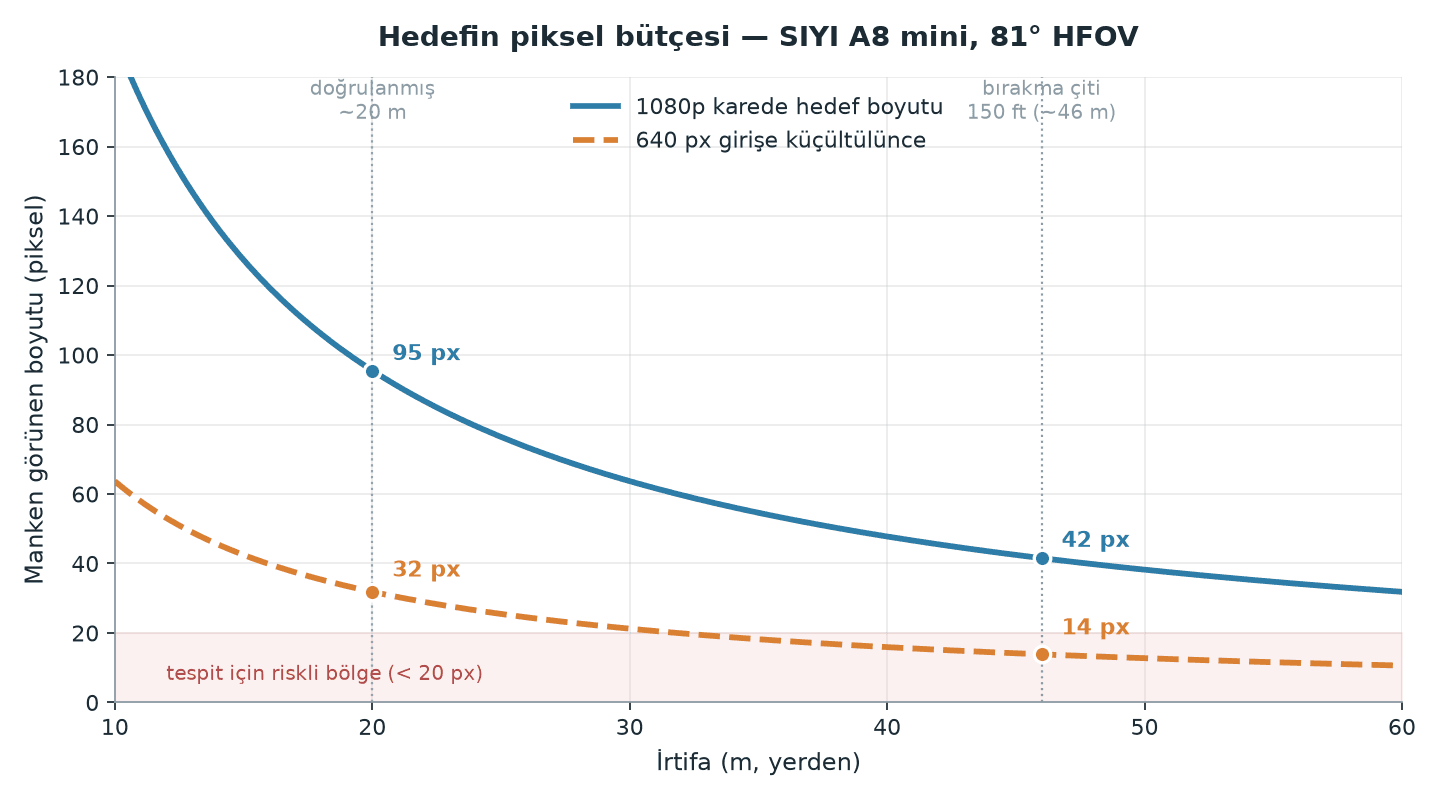
The first question we asked: how many pixels does the target actually occupy in the frame the camera sees?
For a nadir-pointing (straight-down) camera, the ground footprint of the frame and the ground sampling distance (GSD) work out like this:
W_ground= 2 ·h· tan(HFOV/ 2)
GSD=W_ground/N_pixels
For our camera (SIYI A8 mini, 81° horizontal field of view, 1920 px wide):
Altitude | GSD | Mannequin (1.7 m) at 1080p | After downscaling to model input (640 px) |
|---|---|---|---|
20 m | 17.8 mm/px | ~95 px | ~32 px |
46 m | 40.9 mm/px | ~42 px | ~14 px |
Here is the first critical finding: the model never sees the frame as captured. It sees a version downscaled to the input size. At 46 metres, a mannequin that spans 42 pixels in the 1080p frame arrives at the network as 14 pixels.
A 14-pixel object collapses to roughly a single cell in the deep layers of a convolutional network (at the stride-32 stage). The information is gone before the network even starts making a decision.
Step 2: what does the data say?
The physics said "hard," not "impossible." Which led to the second question: had the model ever learned to see an object that small?
We pulled the size distribution of every label box in the training dataset. The result was striking:
Median box size: ~200 pixels
Even the smallest 10% of boxes sat at ~99 pixels
In other words, the dataset did not contain a single example anywhere near the operational size. The model had been trained on objects of 100-300 pixels, and in the field we expected it to find a 14-pixel one.
This does not mean the model was "bad." It was doing exactly the job it had been taught. The job it had been taught simply was not the job in the field.
Step 3: what do the training settings say?
The last piece turned up in the training configuration. Looking at the parameters saved in the model checkpoint, we found the augmentation settings switched off:
scale = 0 matters most here. That parameter randomly scales images up and down during training, which is how you tell the network that "the same object can also appear at other sizes." With it off, the network learns every object at the one size it happens to have in the dataset.
Diagnosis: two causes, one symptom
The picture came together:
No small or distant examples in the data (median ~200 px)
Scale variation turned off (
scale=0)
The two fed each other. The data held no small objects, and augmentation was not synthesizing any either. The result: the network never formed a concept of "a target at distance." That is exactly what explained the binary behavior we saw in the field — perfect up close, zero at range.
What stands out is this: the validation metrics gave no hint of it. The validation set came from the same data, so the model was being examined on the very size range it had learned. The metric was not lying, it was just asking the wrong question.
The fix
Because the diagnosis pointed at the data and at scale, we left the architecture alone. We kept the same model family and changed the following:
Raised the input resolution (960 → 1280)
Turned augmentation on:
scale 0.5,fliplr/flipud 0.5,degrees 15,mosaic 1.0,mixup 0.1Rebuilt the dataset (separate post: "Merging 16,000 Images into a Single Dataset")
Built the validation set exclusively from real aerial imagery
scale and mosaic do the heavy lifting here: they synthesize the small-object population the data does not have. The model now trains on the same target seen at a wide range of sizes.
We held the architecture fixed on purpose. Had we changed the data and the architecture at the same time, we would never have known which one produced the improvement. Moving one variable at a time is what makes a debugging result interpretable.
Results
The retrained model reached mAP50 0.950 on a validation set made up entirely of real aerial frames. More importantly, in field testing it detected both targets and we were able to perform an autonomous drop.
Takeaways
1. Measure the cause before you tune the symptom. Lowering a threshold is no substitute for hunting the root cause.
2. Do the physics. The question "how many pixels is the target?" points the way faster than hours of trying models. Camera field of view, altitude and model input size together form a budget.
3. Look at your dataset's distribution, not just its size. You can have 16,000 images and still not have a single instance of the case you actually need.
4. If your validation set does not represent the environment you will operate in, your metrics will mislead you. An easy metric is not a good metric.
